

Doctify is a tool that influences how patients assess credibility and make final decisions when choosing a dental clinic. How much value you get from it depends entirely on how deliberately you use it.
This guide is written to show you, step by step, how to use Doctify properly. It covers how to decide whether Doctify is appropriate for your clinic, how to set it up correctly, how to build a reliable review system around it, and how to integrate it into your wider marketing and operational processes so it actively supports bookings and treatment acceptance.
The focus throughout is practical execution. You’ll be guided on what actions to take, how to implement them in day-to-day operations, and why each step matters commercially. The aim is not to persuade you to use Doctify, but to help you extract real value from it if you do, and avoid common mistakes that cause it to underperform.
How to build a high-converting Doctify profile

Think of your Doctify profile as your digital reputation showroom. Many dentists create profiles that simply exist. Your aim is to build one that actively reassures patients and supports booking decisions.
Patients don’t arrive on your profile randomly. They arrive already interested and already comparing. Everything on the page should make choosing you feel easier and safer.
Step 1: Get your headline and introduction right
You have only seconds to make an impression. Most patients skim rather than read carefully, so your introduction needs to communicate your value immediately.
Your opening lines should make it clear:
- What you specialise in
- The types of patients you work best with
- What patients appreciate most about your care
- The experience or results you’re known for
Avoid generic statements that don’t change a decision. A line like “General dentist with 12 years’ experience” blends into the background.
Instead, aim for something human, specific, and reassuring, such as:
Cosmetic dentistry
“My work focuses on cosmetic dentistry for patients who want natural-looking improvements rather than dramatic or overdone results. I spend time planning each case carefully so the final outcome looks balanced, suits the patient’s face, and still feels like them.”
Dental implants
“A large part of my practice involves dental implants and restorative dentistry for patients looking for long-term, reliable solutions rather than short-term fixes. I regularly manage more complex implant cases where stability, function, and aesthetics all need to be considered together.”
Endodontist
“I specialise in endodontic treatment, particularly root canal therapy for teeth that are difficult, painful, or have been previously treated. Much of my work involves saving teeth that patients have been told may need to be removed, using a careful and methodical approach.”
Step 2: Choose categories that attract the right patients
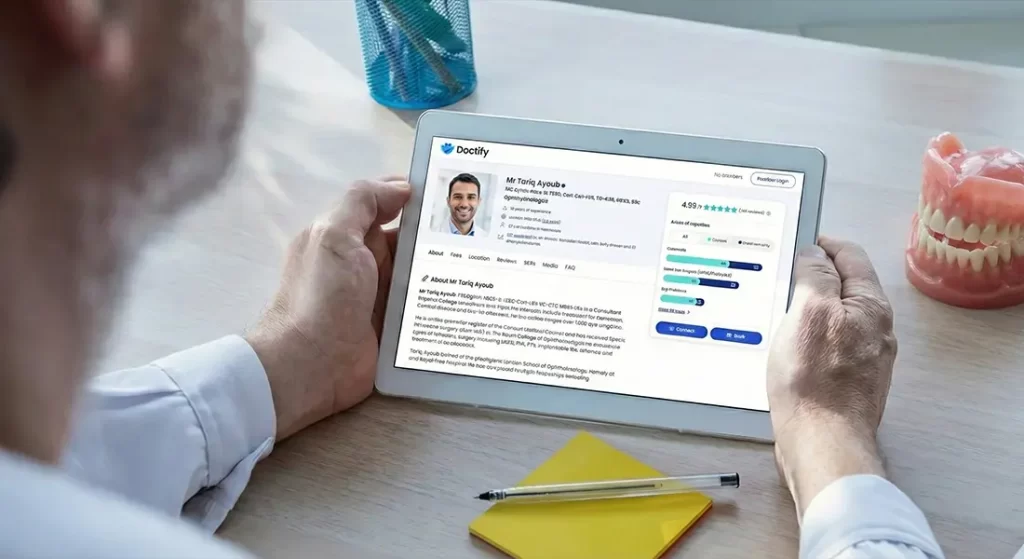
The categories you select determine who sees your profile and why they click through. This isn’t an admin task to rush through. It’s one of the few levers you have to influence the type of patient Doctify sends your way.
Your aim is not to appear broad. Your aim is to appear relevant.
When choosing categories, focus on treatments that generate meaningful revenue, are actively researched before booking, and involve enough commitment or perceived risk that trust influences the final decision.
For most private practices, this usually means prioritising areas such as Invisalign, dental implants, veneers, cosmetic dentistry, sedation dentistry, nervous-patient care, and emergency dentistry.
Be selective. Listing too many categories makes it harder for patients to understand what you’re actually known for and weakens your positioning when they compare you with other clinicians.
A simple rule to apply is this: if you wouldn’t want a patient choosing you primarily because of a category, leave it out.
Step 3: Use photos to remove uncertainty, not to decorate the profile

Patients use images to answer questions they won’t ask out loud. If your photos are poor, outdated, or missing, it creates doubt even if everything else on the profile is strong.
Your aim with photos is not to look impressive. It’s to help patients feel comfortable about what they’re walking into.
Start with a professional headshot. This should be recent, well-lit, and neutral rather than overly stylised. You want to look approachable, confident, and current. Avoid casual selfies, heavy filters, or images taken at conferences or social events. Patients want to see the person they’ll actually meet.
Next, include images of your clinic environment. Focus on areas patients care about such as the reception space, treatment rooms, and any technology that visibly supports comfort or cleanliness. The goal here is to remove fear of the unknown, especially for nervous patients.
Add team photos that reflect how the practice feels day to day. These should look natural and professional, not staged or outdated. Patients are reassured when they can picture the people they’ll interact with, not just the clinician.
Avoid uploading anything that looks old, poorly lit, cluttered, or inconsistent with the experience you actually deliver. If the photos don’t match reality, they will work against you by creating false expectations.
Modern dentistry is visual. Patients expect your profile to reflect a professional, up-to-date environment. If your photos don’t do that, they quietly undermine trust before a single word is read.
Choose the correct entry point, not the “best” package
The most common mistake clinics make is buying visibility before they have credibility.
Your first objective on Doctify is not exposure. It is to establish a credible, complete, and current profile with verified reviews. Anything else is secondary.
Step 4: Explain your treatment strengths in a way patients actually understand

This part of your profile is where many dentists lose patients without realising it. The moment your language becomes technical or academic, patients stop engaging and move on to the next profile.
Your goal here is not to demonstrate clinical breadth. It’s to help patients understand, in plain language, what problems you regularly solve and what outcomes they can expect.
Avoid listing disciplines, techniques, or training areas on their own. Most patients don’t know what these terms mean, and even if they do, they don’t know why they should care.
Instead of naming clinical areas, describe what you help patients achieve.
For example, rather than writing:
“Experienced in prosthodontics, oral surgery, and periodontics”
Reframe it as something a patient can immediately relate to:
“I help patients restore comfort, function, and confidence, from replacing a single missing tooth through to more complex full-mouth treatment.”
This approach shifts the focus from what you do to what the patient gains.
As you write, aim to:
- Use everyday language rather than clinical terminology
- Connect experience to real patient situations
- Emphasise outcomes such as comfort, function, appearance, and longevity
A useful way to check this section is to read each sentence and ask yourself whether a patient with no dental background would understand why it matters to them. If the answer isn’t obvious, simplify it until it is.
When done well, this section reinforces expertise, and makes your experience feel relevant rather than abstract.
Step 5: Add a short profile video that reinforces trust

Your profile video should act as a natural extension of your written profile. Its role is to reinforce confidence by allowing patients to see and hear you before they decide to get in touch.
A duration of around 30 to 60 seconds works best. This gives you enough time to establish credibility and relevance without losing attention or drifting into explanation.
Start by briefly stating who you are and your role, including where you practise. This anchors authority immediately and helps patients orient themselves. There’s no need to go into qualifications or a career history. That information already exists elsewhere on the profile.
Once you’ve introduced yourself, focus on relevance rather than breadth. Explain the types of patients you most commonly treat or the problems people usually come to you with. This helps viewers quickly recognise whether you’re likely to be right for their situation.
You should then touch on how you approach care. Patients respond well to hearing that you take time to explain options clearly, plan treatment carefully, or work at a pace that suits nervous or cautious patients. Keep this high-level and patient-focused. Avoid technical detail or lists of procedures.
If you finish with a closing line, keep it simple. A brief reference to clear communication or thoughtful planning is enough. There’s no need for a call to action or a polished sign-off.
From a practical point of view, film the video in a quiet, well-lit space, ideally within your clinic. Keep the camera at eye level and speak as you would in a consultation. Overly scripted delivery or heavy editing usually reduces trust rather than building it.
Before uploading, apply a simple check. Ask whether a patient would feel more comfortable booking after watching the video than before. If the answer isn’t clearly yes, refine it until it is.
How to choose the right Doctify package and pricing level
Doctify does not publish fixed pricing, and quotes vary by location, competition, specialty mix, and negotiation. However, UK dental clinics are typically quoted within fairly consistent ranges. Understanding those ranges helps you decide what level makes sense before you commit to setup.
Across all packages, what changes is visibility and prominence, not how reviews work or how persuasive your profile is. Paying more increases exposure, not credibility.
Lower-end packages
Lower-end packages are usually quoted in the region of £250 to £400 per month.
At this level, you are paying for a verified professional presence. You can build a full clinician profile, collect verified patient reviews, and appear in relevant treatment categories. Patients can find you, read reviews, and compare you, but you are not being actively promoted ahead of competitors.
This tier is typically appropriate when you are new to Doctify or when you want to establish credibility properly before investing in additional exposure. At this stage, the limiting factor is almost always profile quality and review consistency rather than visibility.
Mid-level packages
Mid-level packages are commonly quoted between £500 and £900 per month.
What you are buying here is increased prominence within the platform. Your profile is more likely to appear higher in category listings and may be shown more frequently when patients browse or filter by treatment type. The profile itself does not change, and neither does the review system.
This level starts to make sense once your profile reads clearly under comparison and reviews are appearing steadily. If those foundations are not in place, the additional spend often results in more views without a meaningful change in patient behaviour.
Higher-end packages
Higher-end packages are typically quoted from around £1,000 per month and can exceed £1,500 per month in competitive areas.
These packages focus almost entirely on priority exposure. This can include featured placement, preferred positioning, or increased visibility when patients are actively comparing clinicians. You are paying to be seen earlier and more often in the decision process.
This level is about acceleration, not correction. It does not improve how convincing your profile is or how trustworthy your reviews appear. In practice, it only makes sense once Doctify is already influencing real decisions in your clinic, such as patients mentioning your profile or showing increased confidence during consultations.
How to collect Doctify reviews properly and consistently

Once your profile is live, reviews are collected through Doctify’s invitation system. Patients do not leave reviews by browsing your profile and deciding to comment. Every review starts with an invitation that you or your team actively send through the platform. That makes review collection an operational process, not a passive one.
How the Doctify invitation system works
Reviews are requested by sending an invitation through the Doctify dashboard. This is typically done by email and includes a secure link that allows the patient to leave a verified review. From the patient’s point of view, the process is quick and straightforward. From your side, the important part is not the technology, but deciding when and how that invitation is triggered.
Because invitations are controlled by you, review collection only works when it’s treated as part of your internal workflow. If invitations are sent inconsistently or only when someone remembers, reviews will come in sporadically and the profile will stall.
Choosing the right moment to send invitations
Timing has more impact on response rates than wording.
Invitations should be sent when the patient has clearly experienced the value of your care and feels settled about the outcome. In most dental clinics, this aligns with treatment completion, a final review appointment, or the point at which the patient has verbally confirmed they are happy.
Sending invitations too early often results in vague or non-committal feedback. Sending them too late usually results in low response rates, because the experience is no longer fresh. The most reliable approach is to link invitations to a defined clinical or administrative milestone rather than to a specific date.
Making review collection consistent, not reactive
Once the timing is defined, consistency becomes the priority. Invitations should be sent the same way, at the same point, for every suitable patient.
This usually works best when one role owns the process. That might be a treatment coordinator, practice manager, or a designated admin role. The clinician does not need to send the invitation themselves, but they should know when it will be sent so the experience feels joined up rather than disjointed.
Doctify allows you to see which invitations have been sent and which have been completed. This visibility matters. It lets you monitor whether the process is running properly rather than guessing or chasing emotionally.
A single, gentle reminder through the platform is usually enough if a patient hasn’t responded. Repeated reminders or manual chasing rarely improves results and can undermine trust.
Setting realistic expectations early on
In the early stages, your goal is not volume. It’s momentum.
A small number of genuine reviews appearing steadily does far more for credibility than a sudden burst followed by silence. Patients pay attention to recency and consistency, even if they don’t consciously realise it.
Send review invitations to patients who have completed treatment and had a normal, representative experience of your practice. Avoid trying to filter only for “perfect” cases. A steady mix of genuine feedback looks far more credible to patients than a small number of overly polished reviews.
When review invitations are sent at the same point in the patient journey, by the same role, every time, the process runs quietly in the background. Reviews come in consistently without chasing, and your Doctify profile stays current rather than spiking and then going dormant.
Using Doctify widgets on your website

Doctify widgets show your verified patient reviews on your website using Doctify’s standard design.
Add the widget to your homepage and to all core service pages so reviews are visible wherever patients are deciding.
Place the widget where it is clearly visible, near your main introduction or booking prompt, and use the same visible position on service pages.
Doctify vs Top Doctors vs Trustpilot
These platforms are often discussed together, but they serve different purposes. The key to using them properly is understanding what role each one actually plays in patient decision-making, rather than expecting them to behave in the same way.
Doctify
Doctify functions as a clinical credibility and comparison platform. Patients use it when they are already considering a clinic or clinician and want reassurance from verified patient feedback. Reviews are invitation-based and linked to real care, which makes them feel more relevant in a medical or dental context.
Because of this structure, Doctify is particularly effective at influencing confidence during comparison and increasingly contributes to visibility in AI-driven recommendations that rely on trusted third-party signals. It is strongest when used as part of a wider system, supporting decisions rather than generating first-touch demand on its own.
Top Doctors
Top Doctors is primarily a clinician-led directory and referral platform. It places more emphasis on individual consultants, credentials, and editorial positioning. Patients often use it when they are searching for a named specialist rather than browsing clinics broadly.
For practices built around high-profile clinicians or specialist reputations, Top Doctors can reinforce authority and professional standing. It is less focused on ongoing review collection and operational integration, and more focused on profile-led reputation.
Trustpilot
Trustpilot is a general consumer review platform with strong brand recognition. Patients use it to form a broad impression of a business rather than to assess clinical suitability or specialist expertise.
Reviews are not healthcare-specific and are less tightly controlled around clinical context. Trustpilot is useful for overall brand reassurance and consumer confidence, but it is less precise when patients are making medical or dental decisions that involve trust in clinical care.
How to choose between Doctify, Top Doctors, and Trustpilot when budget matters

These platforms are often compared together, but in reality you usually can’t justify paying for all of them. Cost, overlap, and internal capacity mean you have to decide which platforms actually earn their place in your marketing stack.
Doctify is designed around verified patient feedback and clinical comparison. Patients use it when they are actively researching dentists and weighing up who to trust with treatment. For dental practices, it plays a clear role in influencing confidence, supporting bookings, and improving how you appear in AI-driven recommendations that rely on trusted third-party signals.
Top Doctors is more focused on individual clinician reputation. It works best when your practice is built around named dentists or specialists and patients are searching for specific people rather than browsing practices generally. If your positioning relies heavily on individual expertise and credentials, Top Doctors can support that authority.
Trustpilot is a more generic review platform. While it has strong brand recognition, its reviews are not healthcare-specific and are less useful when patients are making treatment-based decisions. It also tends to be more expensive than Doctify, particularly when you compare what each platform actually offers to dental practices.
In practice, when budget or internal capacity means you need to make a choice, Trustpilot is often the platform you deprioritise first. Doctify and Top Doctors tend to deliver more relevant value for dental practices, which is why you would usually prioritise them instead.
The key is not to expect one platform to do everything, but to choose the one or two that best support how patients actually choose you.
Frequently asked questions
1. Is Doctify worth using for dental clinics?
Doctify is worth using if patients are researching you before booking, which is now standard in private dentistry. It influences confidence during comparison rather than replacing other acquisition channels.
2. Does Doctify help generate demand, including via AI platforms?
Yes, indirectly. Doctify contributes to demand by increasing visibility and credibility in AI-driven recommendations and comparison tools. AI platforms increasingly rely on trusted third-party signals when surfacing clinics, and Doctify profiles and reviews form part of that signal set.
3. Will Doctify generate enquiries on its own?
You shouldn’t rely on it as a standalone enquiry channel. Its main impact is on comparison and decision-making, but that influence can still translate into additional bookings when combined with SEO, paid ads, referrals, or social media.
4. How long does it take to see value from Doctify?
Value usually appears once your profile is complete and reviews are coming in consistently. For most clinics, this happens within weeks, assuming review invitations are part of routine operations.
5. How many reviews do you need for the profile to look credible?
There is no fixed number. Patients respond more to recency and consistency than to totals. A steady flow of recent reviews is more effective than a high count followed by long gaps.
6. Should every patient be invited to leave a review?
Invite patients who have completed care and had a normal, representative experience. There’s no need to wait for exceptional cases or selectively curate reviews.
7. Do reviews need to be five-star to be effective?
No, but consistently low ratings will harm decisions. Patients don’t expect perfection, but they do expect a strong overall rating supported by recent positive feedback. An occasional less-than-perfect review is usually acceptable if it is outweighed by recent positive experiences. Repeated negative reviews or a low average rating will reduce trust and booking confidence.
8. Can you control which reviews appear on widgets or your profile?
No. Reviews are displayed automatically. Your control is over how consistently you collect them, not which ones are shown.
9. Does upgrading your Doctify package change how reviews work?
No. Reviews function the same way at every package level. Upgrading affects visibility and prominence, not review collection.
10. Should you respond to reviews on Doctify?
Responding is optional. If you do respond, keep replies brief, professional, and neutral. Avoid defensiveness or lengthy explanations.
11. Can Doctify replace Google reviews or other platforms?
No. It should sit alongside them. Doctify carries weight because reviews are verified and context-specific, but it complements rather than replaces other review platforms.
Final thoughts

Doctify can be a useful part of how patients decide whether to book, but it only works when it’s set up and used properly. Choosing the right package, building a clear profile, collecting reviews consistently, and showing those reviews on your website all make a real difference.
If you want help beyond this guide, you can get in touch with our dental marketing company, Clinic Engine, for a chat. We help dental clinics increase bookings and revenue through proven digital strategies that deliver real results.